Events are among the most expensive investments in marketing. But without clear budget control, it's easy to lose track of costs, revenues, and profitability. The new Event Budget Manager – powered by Sweap – bundles all event budgets in one place and provides transparency on how much has been planned, allocated, spent, and earned.
1. The Event Budget Manager – Your Cockpit For Event Finances
The Event Budget Manager bundles all relevant budget data for your events in one place and makes it actively usable. Instead of just documenting, it supports you in your decisions.
At its core, the Event Budget Manager consists of three levels:
Dashboard: Overview of all events
Event details: More in-depth budget control per event
Global management & reports: Organization of categories and partners, including analysis of the entire event portfolio
In addition, there are intelligent category, service provider, and income/expense functions, as well as integration with Sweap Events.
2. Dashboard: All Events and Budgets At a Glance
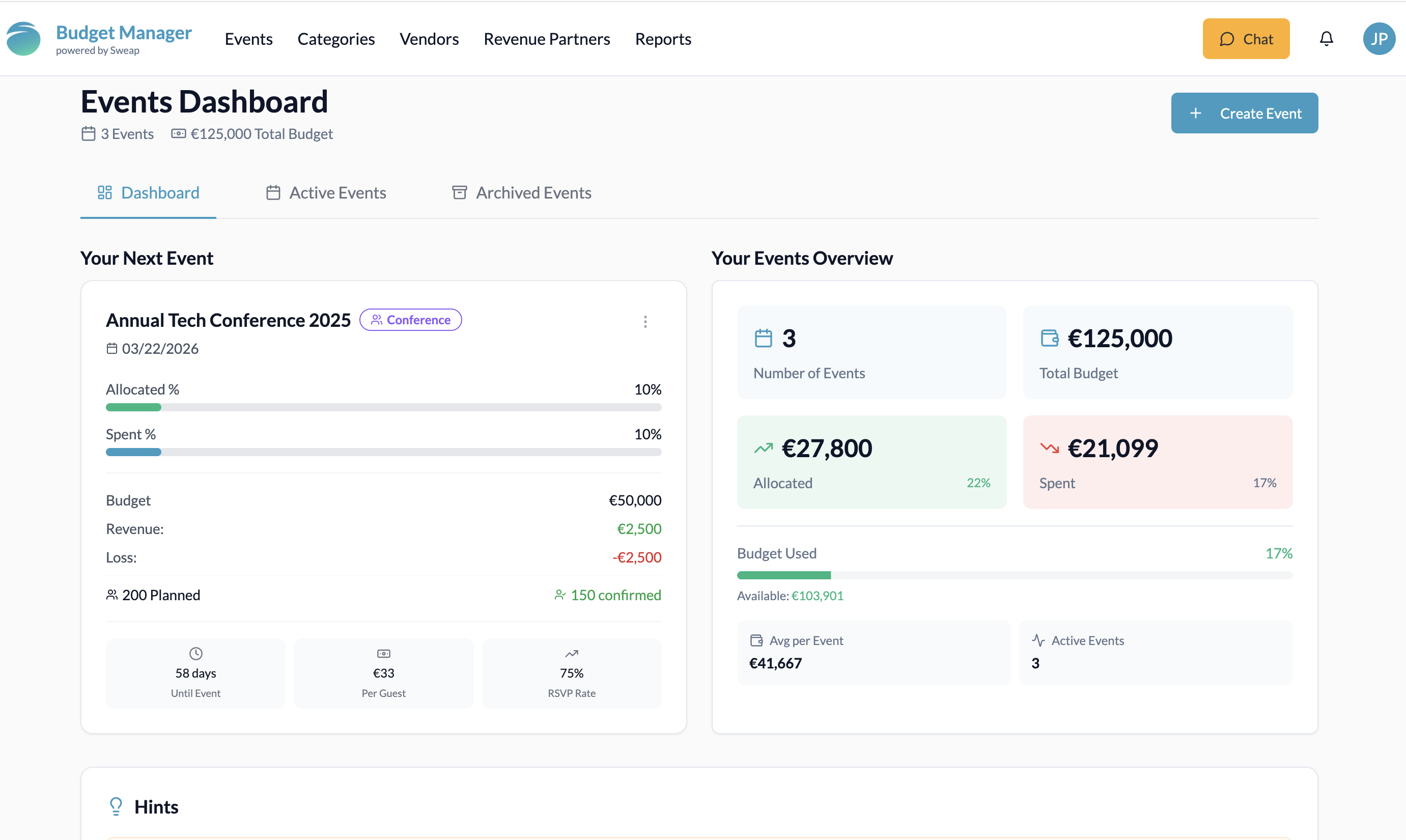
The dashboard is your overview level, essentially your command center. A special display highlights “Your next event” so that you can always focus on what is important next.
This tile contains all the key figures:
Event date
Allocated and already spent budget
Total budget
Revenue and loss
Planned vs. confirmed number of guests
The tile takes you directly to the event details.
Another important feature: you can see information about all your events bundled together in the right-hand tile, allowing you to view the number of events, the total budget across all events, and the allocated and already spent costs. Insights into overall performance and important information about your events are also displayed in the dashboard.
In the dashboard, you can use the corresponding tabs to see which events are currently running, which are coming up soon, and which have already been completed. Active and archived events are clearly distinguishable – without any data being lost. Filter functions help you search for specific events (e.g. by time period, event type or status).
Start smart budgeting for your events now
Keep track of all income and expenses in real time. Try the Event Budget Manager now for 30 days free of charge.
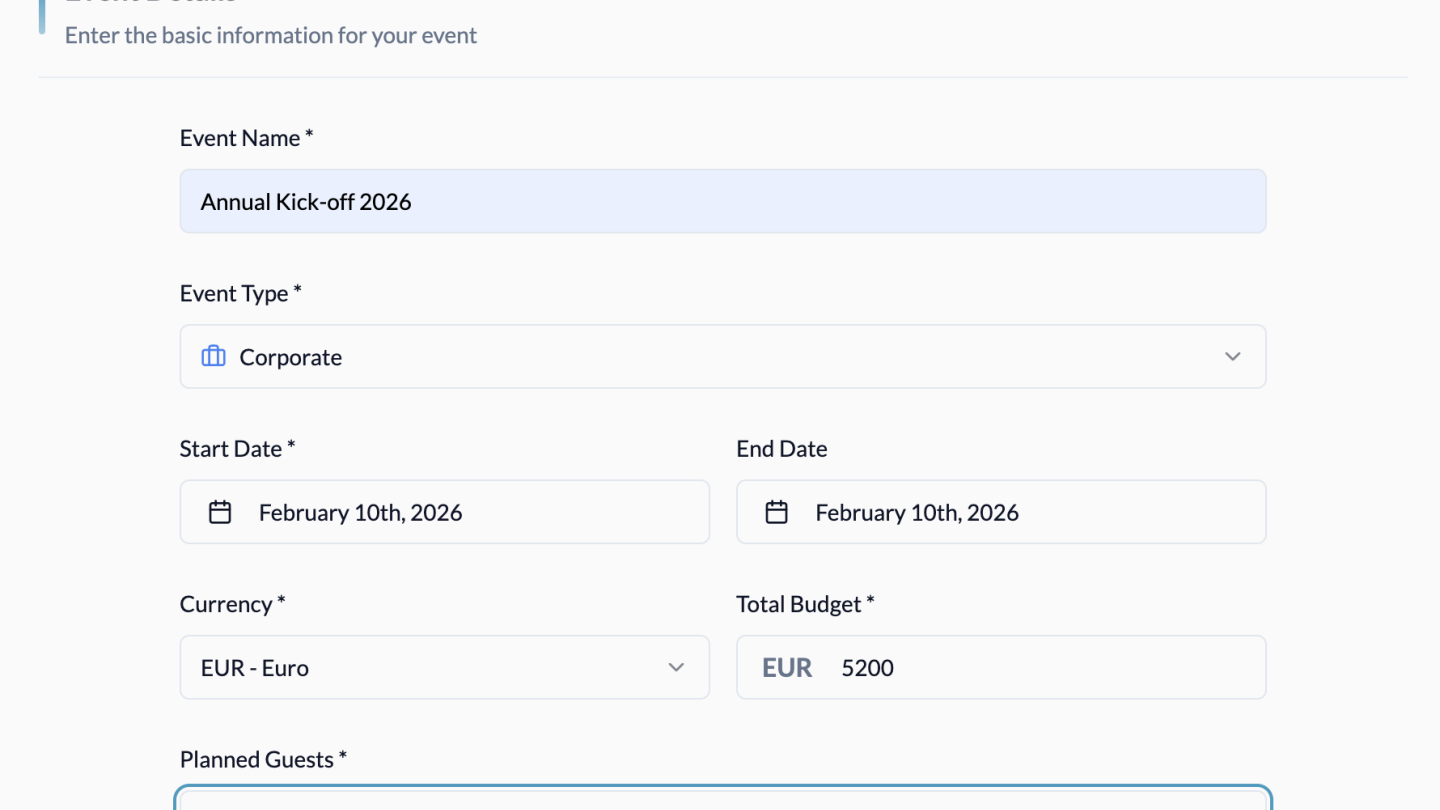
Click on the ‘Create new event’ button to create a new event. Then add the event details: give the event a name, select the event type, set the start and end dates, the currency and, if necessary, add a description. In the Financial Planning section, you can define the total budget and optionally activate income tracking. Under Guest Information, you can enter planned and confirmed guests. At this point, you can already add categories and service providers for expenses and income, and then simply confirm all the information. Now you're ready to start budgeting.
If you have an existing Sweap connection, you can import an existing event directly from Sweap. If you decide to import, key information such as the event title, event period and number of guests will be automatically transferred from Sweap and pre-filled in the form.
4. Event Details: Budget Control for Individual Vvents
Clicking on an event opens the detail view, where the actual budget work takes place.
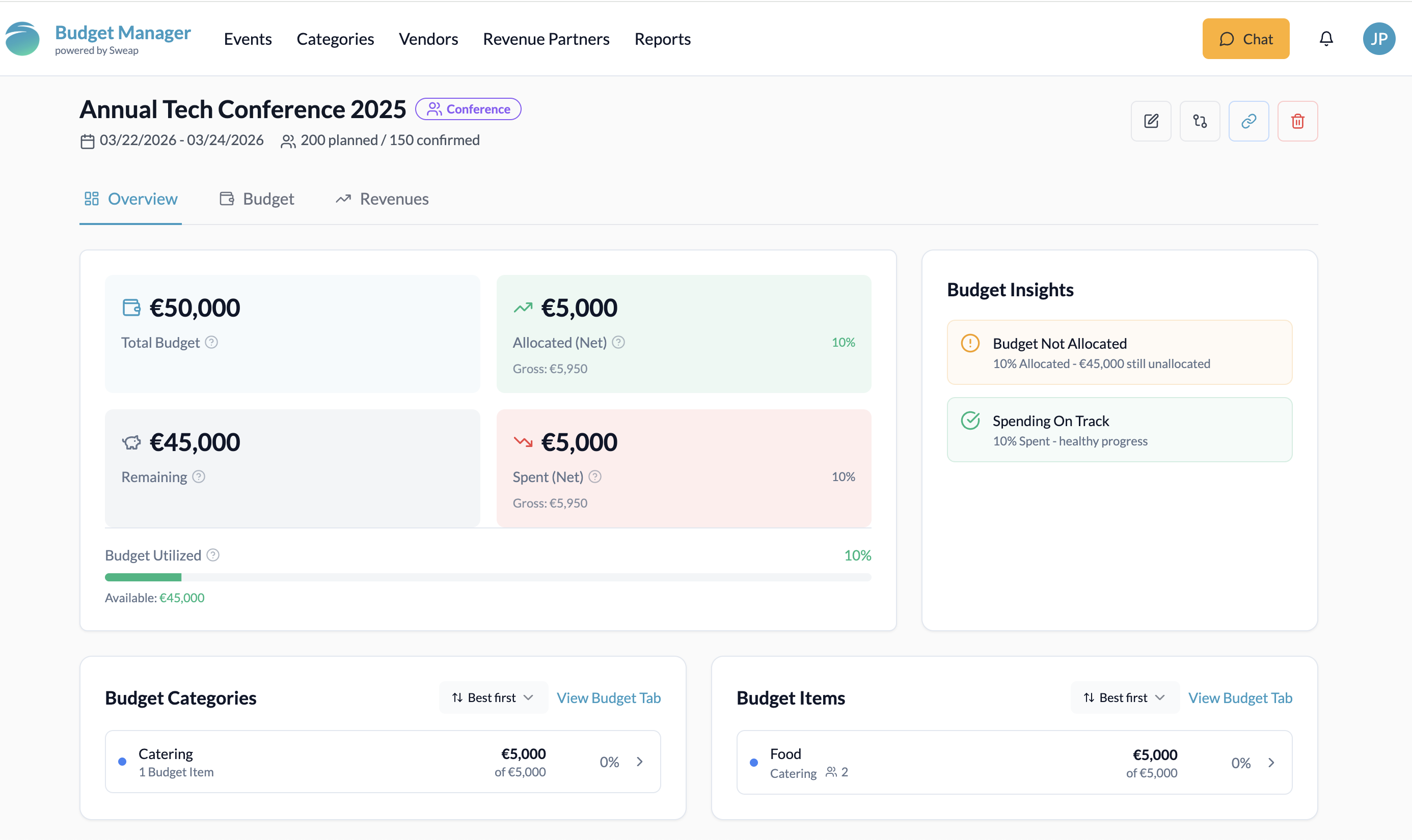
In the event overview, you can see:
Total budget for the event
Allocated budget & remaining budget
Expenses
Categories and budget items
Service providers
Information on income & turnover
Information on event analysis, such as per-guest analysis
and tax overview.
The budget overview allows you to see at a glance which areas are already heavily burdened and how the budget is developing over the course of the project.
In this area, you can also see relevant categories, budget items and service providers, including the amount for your event, at a glance. From there, you can go directly to the Budget tab.
If revenue tracking is activated for the event, you will also find information about your revenue and sales in the event overview, such as sales targets and budget revenue, revenue categories, items and partners.
Important insights into your expenses and income, such as per-guest analysis, income tracking (if available) and recent activities, can also be found in this menu item.
Budget with structure
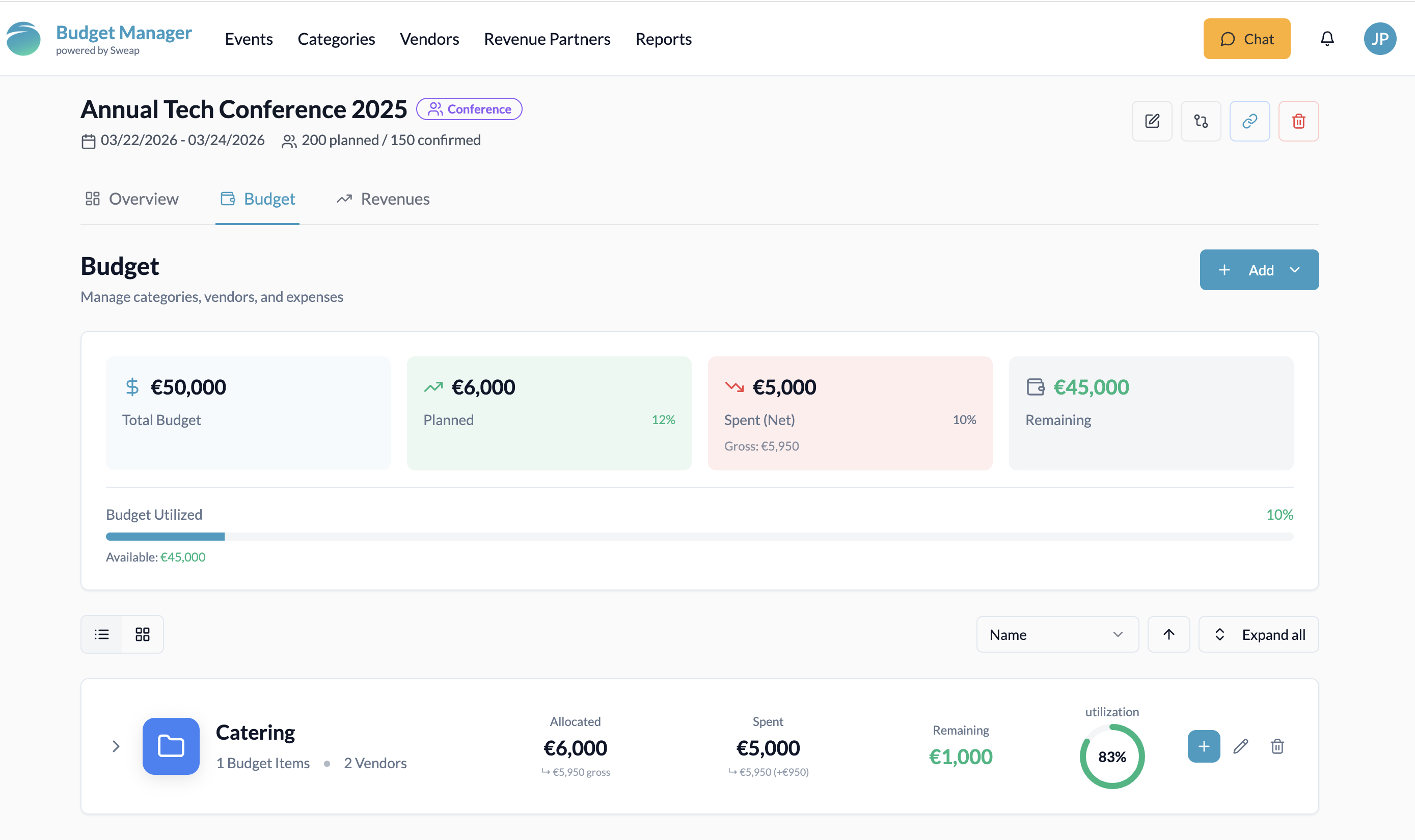
In the Budget tab of an event, you can manage all budget-related elements centrally in one place: categories, budget items and service providers. The area is structured in such a way that you can see both the current status and the details of your budget planning at any time.
Total budget
Planned budget
Budget already spent
Remaining budget
This overview is supplemented by a visual progress indicator that shows you how much of your budget has already been used – both as a bar and as a percentage. This allows you to see immediately where your event stands financially.
Add content flexibly:
You can create new items at any time using the prominently placed ‘Add’ button. You can choose whether you want to add a category, a budget item or a service provider. You can choose between the following content:
If you want to add a category, you can either select an existing category or create a new one. When creating a new category, simply assign a name and colour. The category will then be available to you directly in the event.
Budget items represent the specific cost items within a category. When creating a budget item, you can assign a name, select a category and set a planned budget. The budget item then appears within the relevant category and is included in the budget overview.
You can add expenses directly in this area. Select the budget item and status (planned/quoted/realised) and add the amount of the expense. You can also add a service provider if you wish.
You can also add vendors directly in the budget section. You can select an existing vendor or create a new one, enter a planned amount and, if already known, also enter the actual amount spent. This allows you to assign expenses directly to a vendor and later track exactly what each budget was used for.
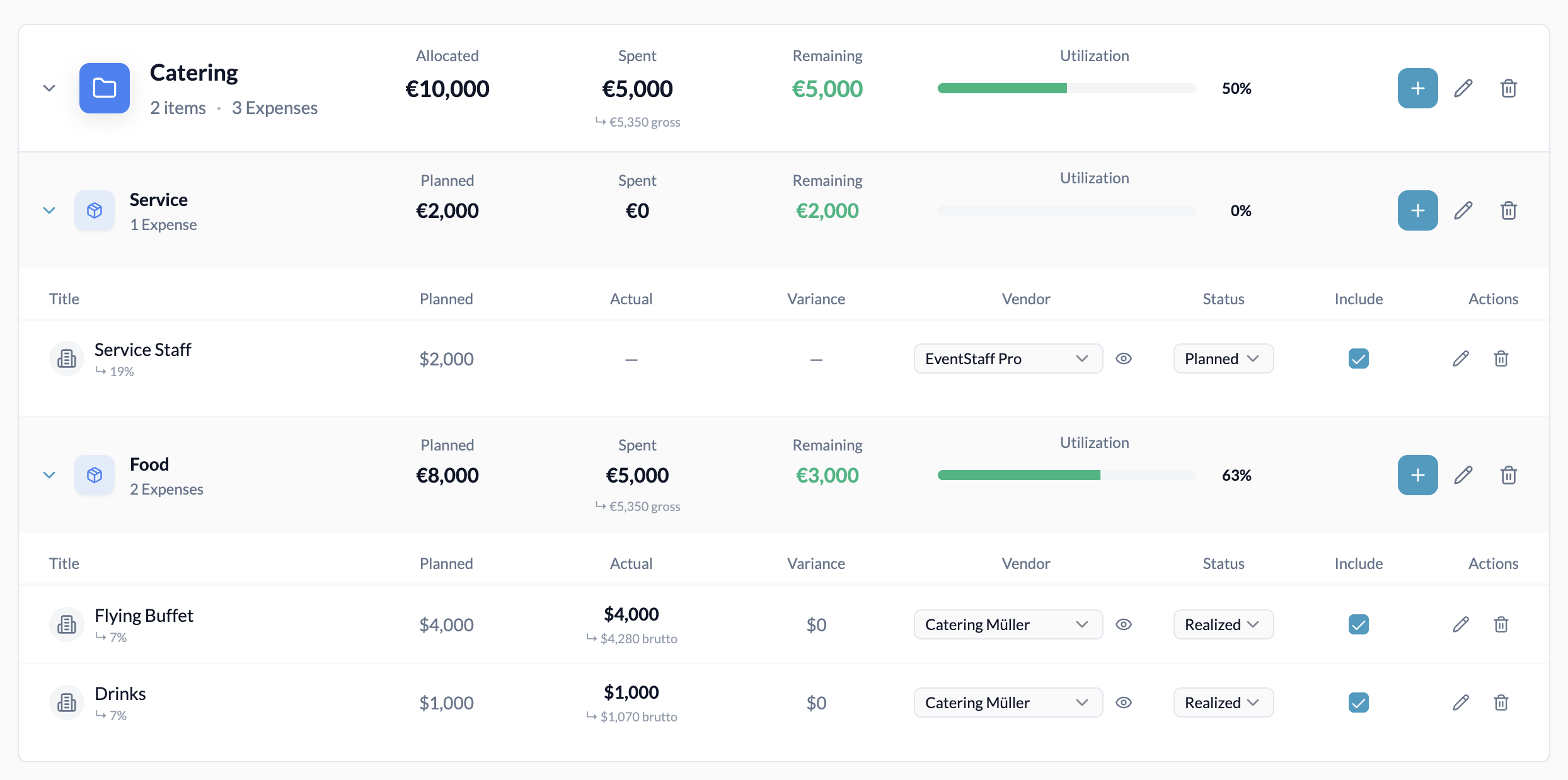
Budget structure overview
Your entire event budget is clearly displayed in tiles per category.
Within a category, you can:
create multiple budget items,
assign a planned budget to each budget item,
and add service providers with planned or actual expenses.
This structure allows you to see at any time how much budget is available for a category as a whole, how much of it has already been allocated or spent, and where individual costs arise.
This not only allows you to keep an eye on your event budget – you can actively manage it.
Example:
You create the category ‘Catering’ with a total budget of €10,000. Within the category, you create the budget item “Food” with a planned budget of €8,000 and another budget item ‘Service’ with €2,000. You can then assign expenses to vendors in the respective budget items, e.g. under ‘Food’, assign the expense ‘Flying Buffet’ for €4,000 to the vendor ‘Catering Müller’, etc.
This creates a clear, comprehensible budget structure: Category → Budget item → Expense incl. vendor. Planned vs. actual budgets are visible at all times.
Revenue: Clearly structure and track sales
In addition to overview and budget, there is a separate revenue tab in the event. Here you can plan and track all event-related sales – just as structured as your expenses.
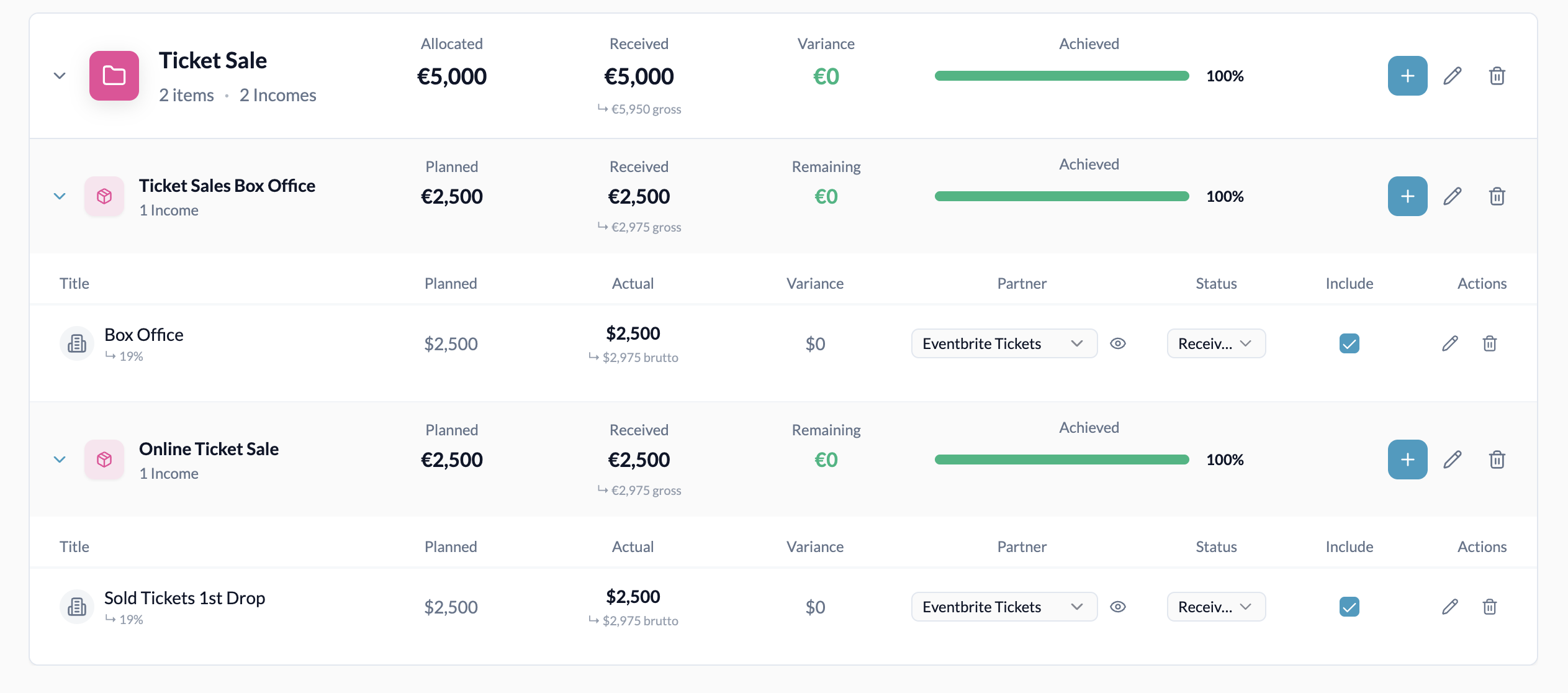
Revenue also follows the familiar logic of category → revenue item → income incl. partner.
For example, you can create a category called 'Food & Beverages', define a revenue item called 'Food Sales' with planned revenue, and add several partners such as catering or beverage services – including planned and already received amounts.
The overview allows you to see how your income compares to your target figures at any time. This makes it clear whether sales are flowing as expected – and how costs and revenues relate to each other.
Take advantage of this opportunity to obtain the Event Budget Manager free of charge!
5. Global management & reports: From individual events to portfolio management
The Event Budget Manager offers real added value when you look at your entire event portfolio rather than individual events.
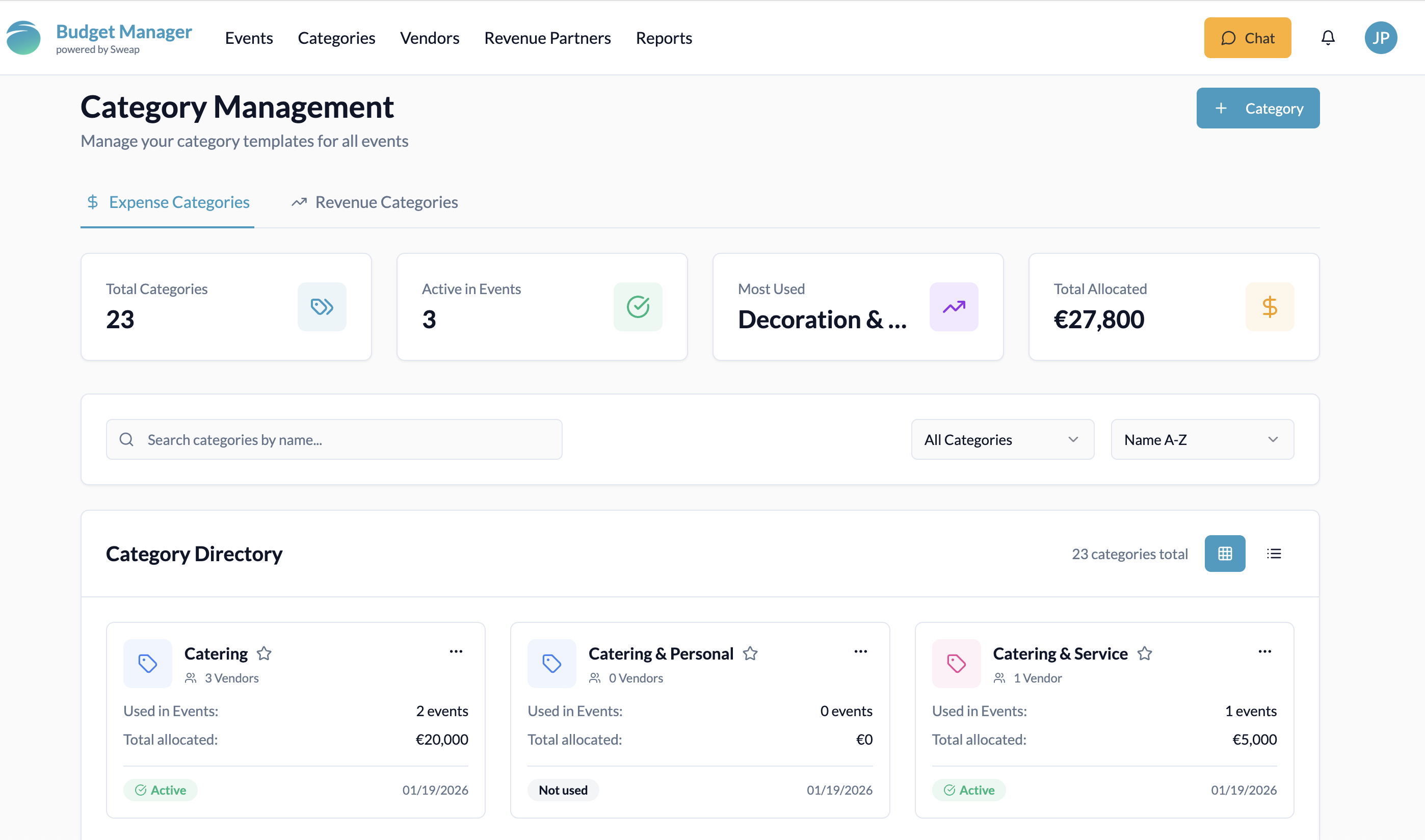
Global category management
You can create a central category directory for both expenditure and income categories and find relevant insights in category management, such as:
Number of events in which a category is used
Total budget per category across all events
Display of most frequently used categories
This option helps you keep track of cost drivers throughout the entire event setup and can, for example, show whether measures such as framework agreements or bundling with service providers could be worthwhile. You can, of course, create new global categories for expenses or income in this area.
Global vendor management
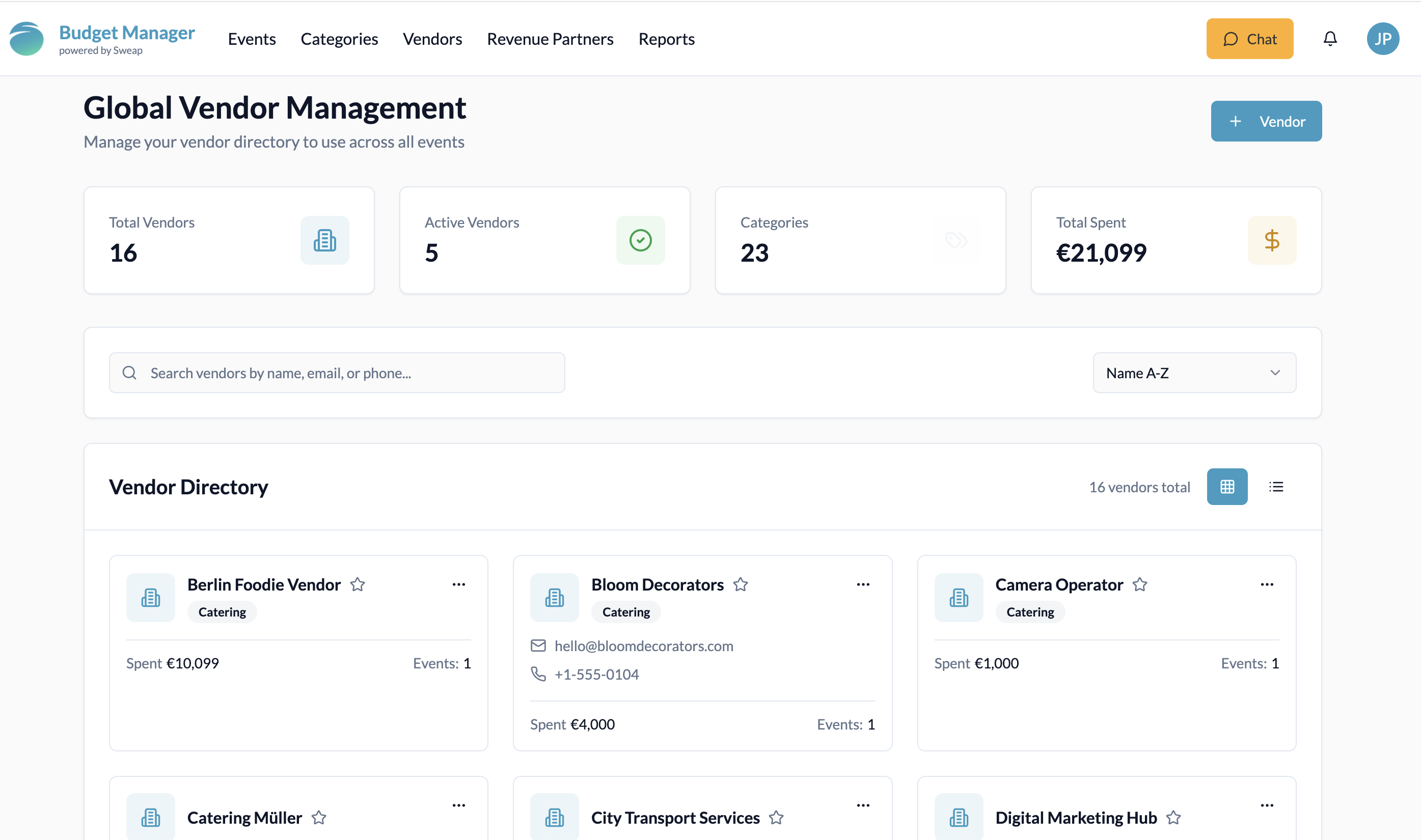
In global vendor management, you can add global vendors and find all existing ones that are already in use. Here you can view the following information:
Directory of all vendor s created
Distribution by category
Total expenditure for vendor and much more.
This overview is intended to provide you with a basis for strategic cooperation, better conditions and quality assurance.
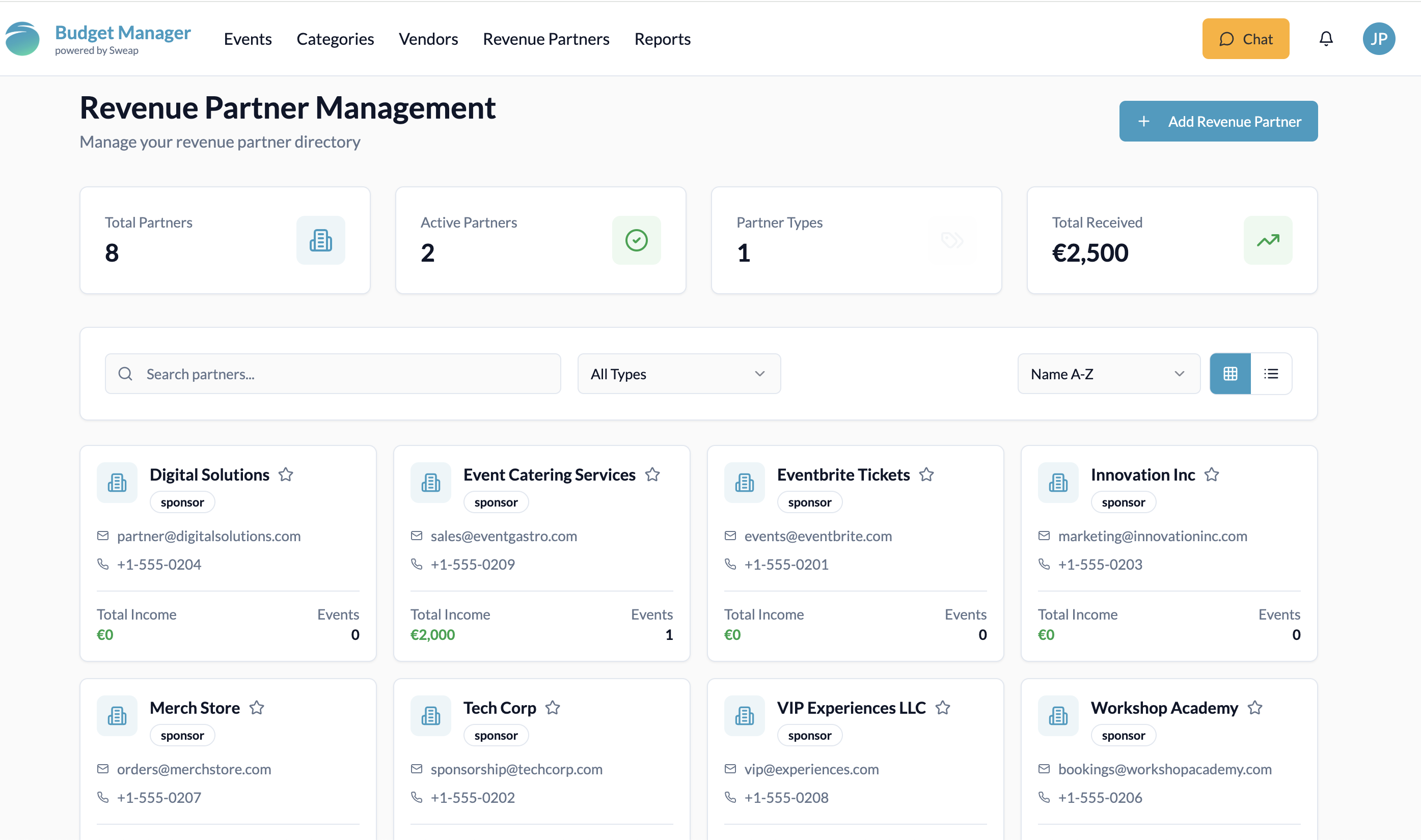
Global Revenue Partner Management
In global revenue partner management, you can create partners centrally and get an overview of all partners already used in your events. Among other things, you will see:
Directory of all created revenue partners
Number of active revenue partners and partner types
Total revenue per revenue partner and other relevant key figures
This overview forms the basis for strategic cooperation, better conditions and a targeted evaluation of your partner performance.
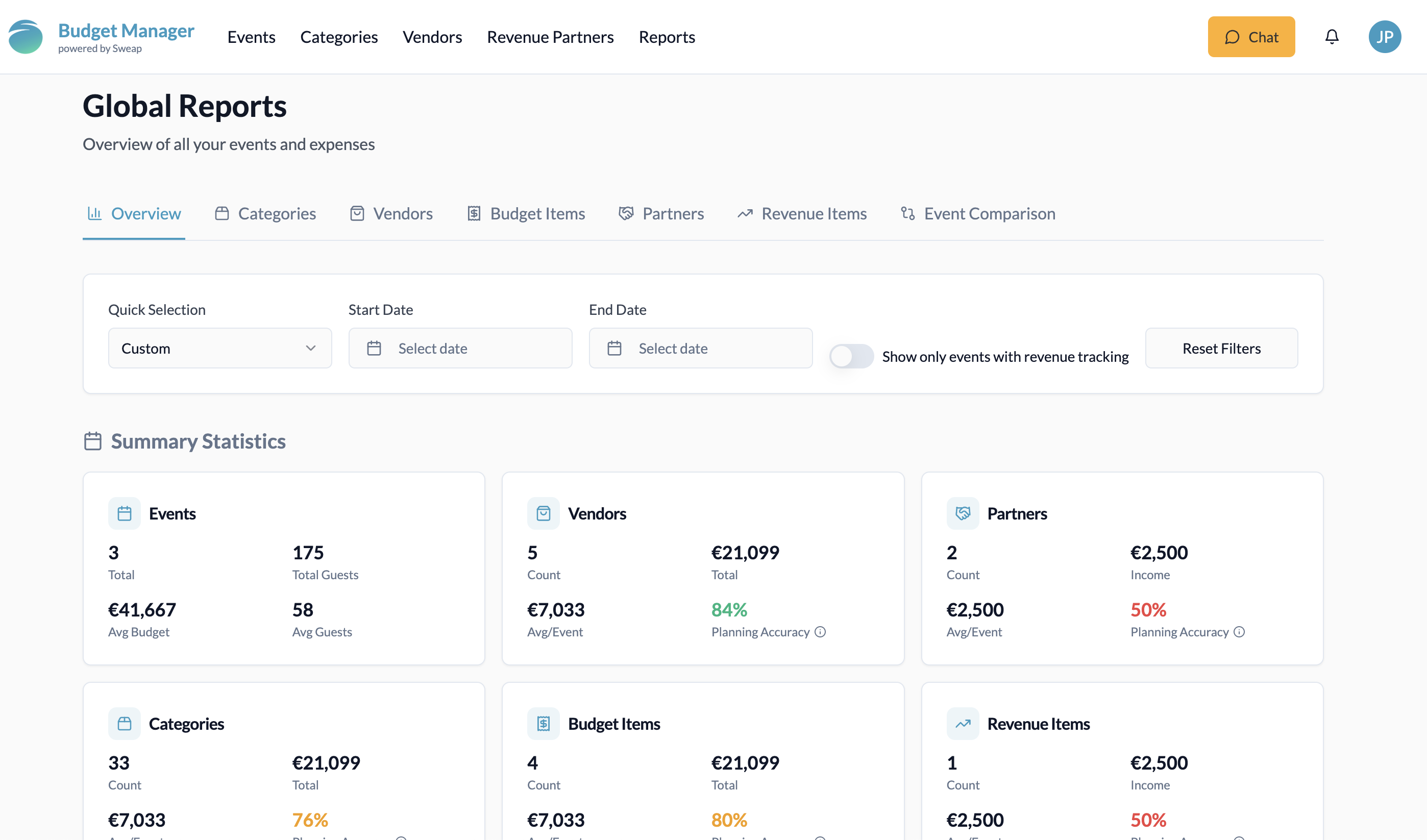
Global reports & analyses
The Reports tab provides you with a central overview of your entire event portfolio. All relevant information on events, vendors, revenue partners, categories, budget and revenue items is brought together here.
At a glance, you can see:
Insights into budgets and revenues
Target figures vs. actual values
The accuracy of your budget and revenue planning
In the sub-tabs, you can analyse and compare individual areas in detail, including categories, vendors, budget items, revenue partners and revenue items. This allows you to quickly identify which cost or revenue drivers are common to multiple events.
In addition, you can select two to four events in the event comparison section and compare them directly. This allows you to transparently compare the budgets, revenues and performance of individual events and make informed decisions for future planning.
6. From Budget Chaos to Strategic Control
Good budget management is the basis for predictable event costs, informed decisions and a clear view of the ROI of your event strategy. The Event Budget Manager supports you in exactly this: from a quick overview in the dashboard to detailed control of individual events to global analyses of your entire event portfolio. Instead of just asking ‘How much did the event cost?’, you can finally answer: ‘How are our events performing financially, strategically and in comparison to each other?’ You can keep track of all your costs and revenues in a structured way at all times.
Start smart budgeting for your events now
Keep track of all income and expenses in real time. Try the Event Budget Manager now for 30 days free of charge.